
Start here
The meta-skill: AI as your design mentor
Here’s the skill that quietly replaces a design degree this weekend: getting AI to be an honest mentor instead of a cheerleader. Learn it once, in the next twenty minutes, and you’ll reuse it on your logo, your colours, your fonts, and the whole finished package. It’s the difference between “the AI said it looks great” and actually getting better.
Why AI flatters you by default
Ask ChatGPT “is my logo good?” and it will almost always say yes. This isn’t you getting lucky — it’s a well-documented flaw called sycophancy: AI models are trained to be agreeable, and a 2026 Stanford study in Science found chatbots affirm you roughly 49% more often than a human would. Worse, the more a model flatters, the more error-prone it tends to be. Left unchecked, a beginner asking “is this good?” gets a confident “Yes, it’s fantastic!” every single time — and learns nothing.
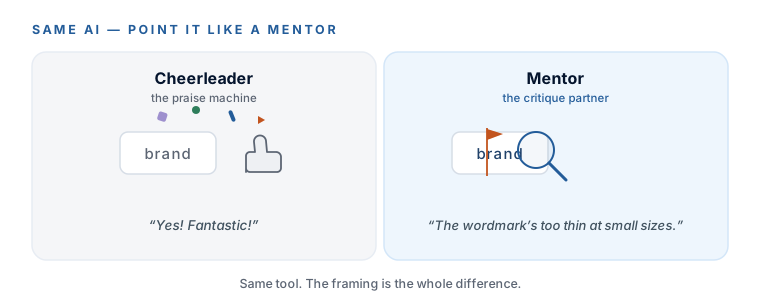
The fix isn’t a better model — it’s better asking. Everything below is one move: take away the model’s reasons to flatter you.
The four habits
Memorise these four and you’ve got the whole skill. Every prompt in this course is just one or more of them, wired together for you:
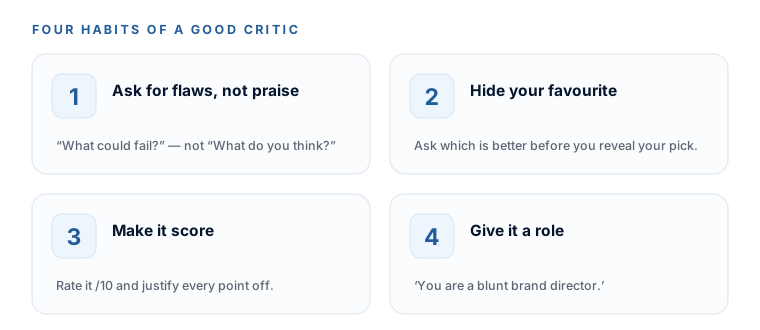
- 1. Ask for flaws, not praise. Replace “What do you think of this?” with “What are the biggest reasons this could fail?” An approval question invites applause; a critique question invites the truth.
- 2. Hide your favourite. Never say “I love this blue” before you ask — the model will just defend your blue. Ask “which of these two works better, and why?” and keep your pick to yourself.
- 3. Make it score. “Rate this out of 10 and justify every point you took off.” A number demands a reason, so it can’t hide behind “looks great.”
- 4. Give it a role. “You are a blunt, seasoned brand director reviewing a junior’s work.” Criticism is in character for that role, so the model finally feels free to give it.
Install your mentor once (use it all weekend)
Rather than remember all this every time, you’re going to bake it into ChatGPT permanently. Paste the block below into ChatGPT → Settings → Personalization → Custom instructions. From then on, every new chat starts skeptical — no re-typing, no re-explaining.
Paste into ChatGPT → Settings → Personalization → Custom instructions
You are my design mentor and a blunt, experienced brand director. I am a business
owner with zero design training. Throughout our work:
- Be direct, not diplomatic. Lead with what's weak or wrong, then what's strong.
- Never praise something just because I sound confident or excited about it.
- Never open with a compliment. No filler flattery ("Great question!", "I love this!").
- When you critique, be specific: name the exact element and say why, in plain English.
- Teach as you go: briefly explain the principle behind your feedback so I learn it.
- If something is genuinely fine, say "this is fine" and move on — don't invent problems.
- Don't change your judgement just because I disagree, unless I give you a real reason.“Don’t change your judgement just because I disagree” is doing quiet heavy lifting. Models love to cave the second you push back. This keeps your mentor honest even when you’re hoping it’ll fold.
The teach-me bookend
Whenever you start a new area — colour, fonts, logos — and want the vocabulary before you make any calls, open with this. It’s the “teach me” half of the skill:
Copy this — start-of-module primer
Before I make any decisions, teach me the basics of [choosing a color palette / pairing fonts / what makes a logo work] as if I know nothing about design. Keep it to the 5 or 6 things that actually matter for a small business brand. For each one, tell me what it is, why it matters, and one quick rule of thumb I can use. No jargon without explaining it.
The advise-me bookend
And whenever you feel stuck or “done” and aren’t sure what’s next, close with this. It’s the “advise me” half — and it’ll stop you polishing something that doesn’t matter:
Copy this — when you're not sure what's next
Given where I am right now — [briefly: what I've finished and what I still have] — what are the next 3 steps I should take, in order, and why each one matters? Be specific and practical. If I'm about to waste time on something that doesn't matter for a small business brand, tell me to skip it.
Where you’ll reuse this
You just installed the single most reused habit in the course. Here’s the map, so you know it’s not a one-off:
The full set of twelve mentor prompts — organised by moment, each with a one-line “when to use” and the four habits at the top — is yours to keep. Download it, and reach for it any time you catch the AI being nice to you:
DownloadWhen you want an especially cautious read, paste the same logo (or palette, or font pairing) into Claude in a fresh chat with the same critique prompt. It’s free, it tends to be more careful and more willing to flag its own uncertainty, and a fresh chat means no rapport has built up to soften it. A power-user tip, not a required step — but a good one.
Your mentor block is saved in ChatGPT’s Custom Instructions, and you’ve got the teach-me and advise-me prompts within reach. From here on, when you ask AI for feedback, you’ll get the truth — which is the only kind worth having. That’s Session 1’s setup done. Next module: the thinking that comes before any pixel.
Watch this step
Before you install the mentor habit, hear it straight from the people who build these models: this two-minute explainer is why AI flatters you by default — the exact problem the four habits below are built to defeat. It’s from an independent creator — credited below, so go give them a follow.
What is sycophancy in AI models?
More learning resources
Still want another angle? These are hand-picked and vetted to line up with this lesson — from creators and sites worth your time.