
Module 7 · The Brand Book & Your Finished Package
Put your brand to work
A brand only earns its keep when it gets used. This lesson is the “now what” — exactly how each file you made gets handed to a designer, to an AI, and (the big payoff) straight into your next project. You built a package; here’s where every piece plugs in.
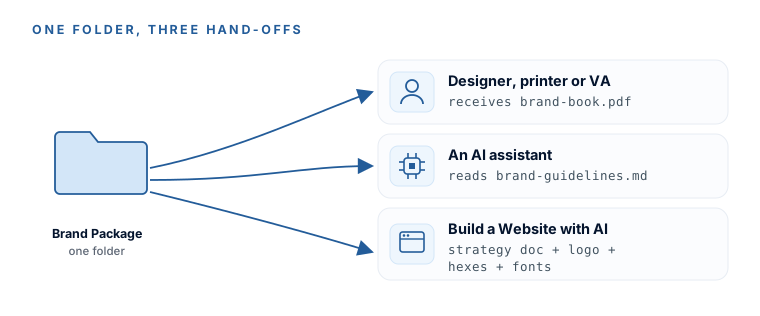
The general handoff
- To any human — a designer, a printer, a VA — hand over the folder and the
brand-book.pdf, and say “stick to these.” That’s the whole brief. - To any AI — give it
brand-guidelines.mdand tell it, explicitly, “follow this brand file.” The explicit instruction measurably improves how closely it sticks to your brand.
The one-line AI handoff
Follow this brand file for everything you write and design for me — colors, fonts, voice, and logo usage. Do not deviate from it. Here it is:

[paste the full contents of brand-guidelines.md]
Where each file plugs into your website build
This is the real reason the brand comes first. If you take (or are about to take) Build a Stunning Website with AI, your package removes the hardest, slowest parts of that build before you even start:
- Before you start
The strategy doc
Goes into the website project asbrand-strategy.md. You can skip that course’s discovery interview entirely — yours is richer, because it carries your actual spoken voice. - First build
The logo SVG + PNG
Drop them into the site’s assets folder before the first build prompt — so there’s never a placeholder-logo phase. - Design
The hexes & two font names
Feed the design stage, so the site renders on-brand from the very first draft. - Copy
The voice section
The strategy doc’s voice guidelines and website-copy instructions exist precisely to be attached as AI context — that’s why they’re in there.
This folder is the reason to. Everything you built this weekend was designed to drop straight into that build — you’ve effectively already done its first three lessons.
Want the empty folder structure again to make sure everything’s filed in the right place? Here’s the same kit you set up back in Module 3:
DownloadYou know exactly how your brand gets used — by a person, by an AI, and inside your next website. The package isn’t a trophy on a shelf; it’s the input that makes everything you build next look like it was done on purpose.
More learning resources
Still want another angle? These are hand-picked and vetted to line up with this lesson — from creators and sites worth your time.