Start here
Welcome & what you'll walk away with

Hi, I’m Pete — welcome 👋
I’ve spent nearly twenty years creating brands and websites — for my own companies, and for the owners I work with — and I’ve watched too many good business owners freeze at exactly this step. What they ask me is some version of “am I supposed to hand a studio five figures, or slap a free logo-maker template on everything and quietly hate it?” Neither. There’s a third road now, and this course is it.
By Sunday night you’ll have a complete, professional brand: a logo in every file you’ll ever need, a colour palette you can defend, a font pairing that looks chosen instead of defaulted, a proper brand book, and a strategy document that quietly runs every decision underneath it. You have zero design training. That’s fine — that’s exactly who this is built for. There’s no design software to learn and no jargon to memorise; if you can describe your business out loud, you can do this.
I built it the way I’d walk a friend through it at my kitchen table: one small step at a time, every prompt written out for you, and an honest heads-up wherever there’s a catch. You bring the business. The tools and I bring the rest.
One thing worth knowing up front: I wrote the whole path — every lesson and every prompt in it. But for the click-by-click screen work — converting your logo into a vector, shuffling a palette in Coolors, laying out the brand book in Canva — I’d rather show you than describe it, so I hand-picked the clearest video for each of those steps and dropped it at the bottom of the lesson it belongs to. All 22 are by independent creators, each credited with a link to their channel; go give them a follow.
What you’ll walk away with
Not a vague “brand vibe.” Concrete files, sitting in one folder on your computer, ready to use the moment you finish — plus one habit that outlasts the weekend:
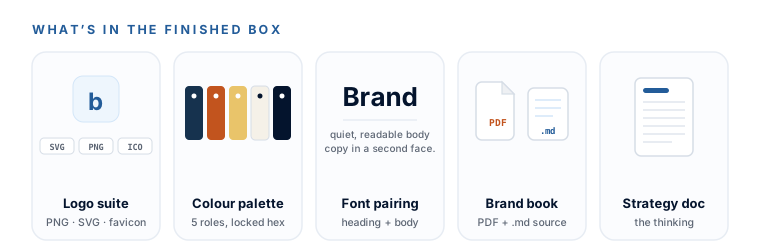
- A logo suite — your mark as a crisp PNG, a transparent version, a black-and-white version, a social avatar, a favicon, and the crown jewel: a true
.svgvector that stays razor-sharp from a favicon to a billboard. - A colour palette — four or five colours with exact hex codes and a role for each, so nothing ever clashes and you never guess again.
- A font pairing — two Google Fonts that belong together, free forever, with the exact names your future website will ask for.
- A brand book — twice — a pretty PDF you hand to humans, and a plain
brand-guidelines.mdfile you paste into any AI to keep it on-brand. Same brand, two audiences. - A 10-section strategy document — the thinking underneath it all, in your own voice, that becomes the context for every future decision (especially your website copy).
- The habit that made all of it possible — using AI as a blunt design mentor instead of a cheerleader: teach me, critique this, score it, tell me what’s weak. You’ll reuse it long after the weekend ends.
How this course works
Eight short modules, in the order you’d actually do the work — think first, then find the logo, then make the files, then assemble the package. The written lessons carry the spine; the hand-picked videos sit inside the lesson they belong to and handle the on-screen mechanics. Every module leaves a real file in your Brand Package folder, and it’s all in one place, in order, so you’re never hunting across ten tabs for the next step.
- M0
Start here
The tiny free toolkit, the one honest money conversation, and the AI-as-mentor habit the whole weekend runs on. - M1
Brand strategy
Answer 15 questions out loud; AI turns 30 minutes of talking into a 10-section strategy document in your own voice. - M2
Your logo, part 1
Scan 40–60 directions in minutes, close in on the one with a variation loop, then check it's genuinely yours to use. - M3
Your logo, part 2
The high-res master, a clean commercial-ready SVG, and the five files every business needs — no design editor. - M4
Colours you can defend
Candidates from AI, harmonised in Coolors, seen on a real page at your exact hex codes before you commit. - M5
Fonts that look chosen
One rule, two shuffle tools, an AI cross-check — and the two Google Font names your website build will ask for. - M6
Editing without an editor
The right free tool for each of the five image jobs, plus the habit that replaces skill: describe the edit in plain English. - M7
The brand book & handoff
Assemble both brand books, run one senior-director critique over the whole package, and put it to work.
Those eight modules fall naturally into three sittings, so you can see the whole road before you take the first step:
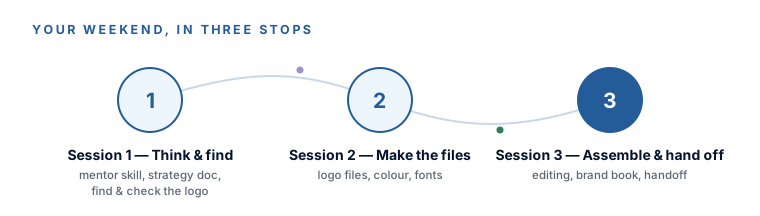
- Session 1 — Think, then find. Install the one AI habit the whole weekend runs on, build your strategy document, then find and sanity-check your logo. (That’s Modules 0–2.)
- Session 2 — Make the files. Turn your logo into real production files, lock a colour palette, and choose your fonts. (Modules 3–5.)
- Session 3 — Assemble and hand off. Learn the tiny editing toolkit, build both brand books, and put the whole package to work. (Modules 6–7.)
How long it takes: 32 short lessons that add up to about nine and a half hours of reading and doing together — which is a weekend, or three sittings of three to four hours on whatever evenings suit you. Nothing here is timed and nothing expires: you can stop mid-module and jump back to any lesson later when you want to change something.
Everything you make here drops directly into our Build a Stunning Website with AI course — the logo, the colours, the fonts, and especially the strategy doc. Take this first, or alongside it. You’re not doing throwaway work; you’re building the foundation the site stands on.
What it costs
The course is completely free — no gate, no upsell — and so is nearly every tool in it. Coolors, Realtime Colors, Google Fonts, Kittl’s SVG converter and Canva all do their part on a free account, and the voice recorder you’ll use in Module 1 is already on your phone.
There’s exactly one honest asterisk, and the next lesson lays it out properly: the logo step generates a lot of images, and ChatGPT’s free tier only makes about two or three a day. So you either spend $20 on one month of ChatGPT Plus and cancel when the weekend ends, or stay completely free by running the image-heavy steps in Ideogram or Google Gemini instead. The same prompts work in all three. That’s the entire cost conversation.
This weekend gives you a brand package you own and can defend. What it can’t do is make the decisions for you — AI will happily generate a hundred directions and then tell you every one of them is wonderful, which is exactly why the third lesson in this module teaches you to make it stop. You stay the one choosing. And this is a course for a blank page: if you already have a brand you genuinely love and only want to tidy or extend it, you don’t need this. If you’re starting from “we don’t really have a brand” — you’re in exactly the right place.
You know the finish line (five files and one habit, in one folder), you know the shape of the weekend (eight modules across three sittings), and you know what it costs. Good — because it really is doable without a design bone in your body. Next: the tiny toolkit, and the one honest money conversation.
If you’d like to read more about my own background and experience, check out my about page.